Formula Fix

Make Your Excel Files Run 70–80% Faster

Stop waiting for slow spreadsheets. Process large datasets smoothly and eliminate Excel freezes using Formula Fix.

Formula Fix is an automation system designed to improve the performance of Excel files that contain large datasets and heavy formulas.

Many professionals work with spreadsheets that contain thousands of formulas across hundreds of thousands of rows. As these files grow larger, Excel begins to slow down, calculations take longer, and files may freeze or crash.

Formula Fix solves this problem by changing how formulas are handled inside Excel.

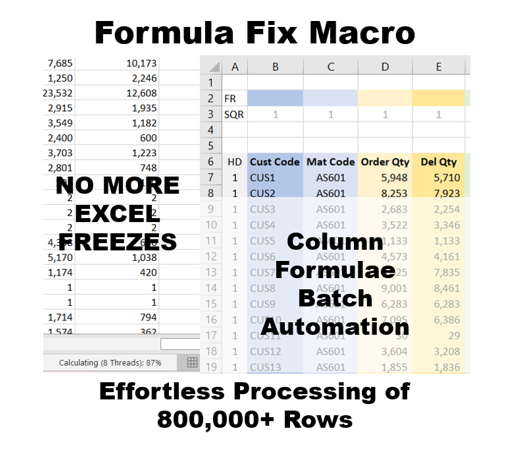
Instead of maintaining formulas across the entire dataset, the system stores formulas in a single control row. When the automation runs, the formulas are applied across the dataset and the calculated results are stored as values.

This dramatically reduces the computational load on Excel.

The result is faster spreadsheets, smaller files, and a much more stable Excel environment.

The system works directly inside Excel and requires no installation, no add-ins, and no complex setup.

Users can begin using the tool in three simple steps within five minutes.

Works on Windows laptops only. Not supported on Mac.

Price range: ₹500.00 through ₹5,000.00

Who It’s For

Formula Fix is designed for professionals who regularly work with large Excel datasets.

Typical users include:

  • Data analysts
  • Finance professionals
  • MIS executives
  • Reporting professionals
  • Supply chain planners
  • Operations Planners
  • Manufacturing or Production Planners
  • Business analysts

If your work involves large spreadsheets with heavy formulas, this tool can significantly improve your productivity.

Problems It Solves

Professionals working with large Excel files commonly face several challenges.

Excel Freezing or Crashing

Large models with thousands of formulas create heavy calculation loads, causing Excel to freeze or show “Not Responding”.

Long Calculation Times

When Excel recalculates formulas across a large dataset, calculations can take 10–15 minutes or more.

Very Large File Sizes

Formula-heavy spreadsheets grow extremely large and become difficult to manage.

Long Working Hours

Slow spreadsheets delay reporting and force professionals to spend more time waiting for calculations to finish.

Formula Fix removes these bottlenecks and makes Excel run much more efficiently.

Key Features & Benefits

Formula Control Row

Users maintain formulas in a single row instead of across the entire dataset.

Automated Formula Processing

The system automatically applies formulas column by column across the data.

Converts Formulas to Values

After calculation, formulas are replaced with values, preventing repeated recalculations.

Handles Very Large Datasets

The system can process datasets of 500,000 to 800,000 rows smoothly.

Reduces File Size

Excel files can shrink to 30–40% of their original size.

Improves Stability

Reducing active formulas significantly lowers the chances of Excel freezing or crashing.

Users often experience 70–80% faster processing for large spreadsheet tasks.

Enables Fully Automated Systems

Forms the foundation for developing End to End fully automated systems

How It Works

Getting started takes just a few minutes.

Step 1 — Download the File

Download the Formula Fix Excel file from the website.

Step 2 — Enable Macros

Open the file and enable macros so the automation can run.

Step 3 — Activate the Product

Enter your license key and begin using the system.

Once activated, you can start processing large Excel datasets immediately.

Short 1–2 minute videos are available on the Home page showing these steps clearly. To access the vidoes click HERE

Once activated, you can start working immediately.

Follow the demo videos on this page to see how to use the product.

Subscription Details & Pricing

Monthly Access:

Suitable if you want short-term or limited-period usage.

Yearly Access:

Best value if you automate your sheets throughout the year.

Renewals are manual.
Your access validity and remaining days are clearly visible while you use the tool.

Internet is required only for activating the tool.
After activation, the tool works inside Excel on Windows.

More information on subscription, license and activation are in the FAQs section of the Home Page which can be accessed by clicking here

License Usage

Each license is linked to:

  • One email ID
  • One Windows laptop at a time

The tool will not work on multiple laptops simultaneously and is not supported on Mac.

If you need to change your laptop, you can contact the service desk and the license will be reset for you.

What Your Access Includes

  • Use of the tool during your active access period
  • Access to newer versions released during that period
  • Improvements and refinements over time

The tool works directly within Excel and requires no additional software.

Common Use Cases

  • Monthly Sales Data Processing
  • Financial Reporting Models
  • Supply Chain Data Analysis
  • MIS Reporting Files
  • Data Cleaning and Transformation
  • Audit and Reconciliation Work
  • Budget Consolidation Models
  • Operational Data Analysis
  • Large Lookup-Based Models
  • Preparing Data for Dashboards

Support

The tool is designed to work out of the box, but we will help you in setting up the system for the first time.

Even after that if you ever need:

  • Guidance for your specific use case
  • Custom changes or enhancements

Paid 1-on-1 support is available separately, only if required.

Launch Pricing (Limited) :

Available only up to 31-May-2026

Quick Demos

Additional information

Tenure

1 month, 12 months, Free 1 Month Trial

Reviews

There are no reviews yet.

Be the first to review “Formula Fix”

Your email address will not be published. Required fields are marked *

Limited-Time Launch Support

Only the users opting in by 31-May-2026 receive:

  • Free 1-on-1 product support during the first month
  • Help to get fully set up without stress

After this date, this support is removed and pricing increases.

Days
Hours
Minutes
Seconds

Lock in launch pricing before the timer runs out.

Once the launch window closes, this price will not return.

Related products

Book a Consultation

If you want personal guidance or help adapting the tracker to your situation :

Frequently Asked Questions

Do I need to install any software?

No installation is required. The system works directly inside Excel.

Do I need any Excel add-ins?

No add-ins are required. You only need to enable macros.

How long does it take to start using the tool?

Most users can start using it in less than five minutes.

Do I need to rewrite my formulas?

No. You simply place your existing formulas in the control row.

Can this handle very large datasets?

Yes. The system has worked smoothly with datasets up to 800,000 rows.

Is my data secure?

Yes. All calculations run locally inside your Excel file.